9. Multi-BPL applications and modules
A host EXE that loads its business logic from runtime packages at startup is the case this debugger was built for, not an afterthought bolted on later. Everything here works on a single-EXE build too — it just has nothing to do.
What works across package boundaries
- Lazy per-module symbol loading. Each DLL or BPL has its debug information read as it loads at runtime, not up front.
-
Breakpoints in packages that have not loaded yet. Set one in a unit
belonging to a BPL that
LoadPackagehas not reached; the binding is deferred and applied the moment the package maps. - Stack unwinding across host and package. A call that goes from the EXE into a BPL and back produces one continuous call stack.
- Symbols resolved from the owning binary. Two loaded binaries can contain a unit of the same name, or a class of the same name, and locals and globals still resolve against the right one.
-
A BPL’s
.dcpsupplies its debug information — the same format as an.rsm, in the file the package build already produces. - Address and data breakpoints survive an unload and reload. Address breakpoints are stored per module and RVA (see chapter 3), so a package that is rebased on reload does not lose them.
The Delphi Modules view
A tree view in the Run & Debug sidebar listing what is currently loaded and the state of each module’s symbols.
The order is not alphabetical. The host executable comes first, then every module without debug information, then the rest. The problem cases are put where you will see them instead of somewhere down a list of ninety packages — because “my breakpoint will not bind” almost always ends here.
Each row states its symbol status next to the name: indexing while a symbol file
is still being read, no debug information, or the list of formats that actually
loaded — TD32 (embedded), .map and so on. That naming is deliberate: TD32
lives inside the binary while the others are separate files, and “.map
only” is a materially different situation from “TD32 and
.rsm” — the first gives you lines but no types and no locals.
Expand a module for its full path, load address, image size, and the same format list. That path is worth checking whenever behaviour does not match the source you are looking at: it tells you whether the BPL being debugged is the one you just built, or an older copy earlier on the search path.
A module carrying no debug information says so in plain words — none found — breakpoints here cannot bind — rather than leaving you to infer it from an empty format list.
Filtering matches on name and path together, case-insensitively, and
several words are ANDed: bpl win64 shows modules whose name
or path contains both. The line above the list always says how many of the loaded modules
are being shown, so a filter can never quietly hide something you were looking for.
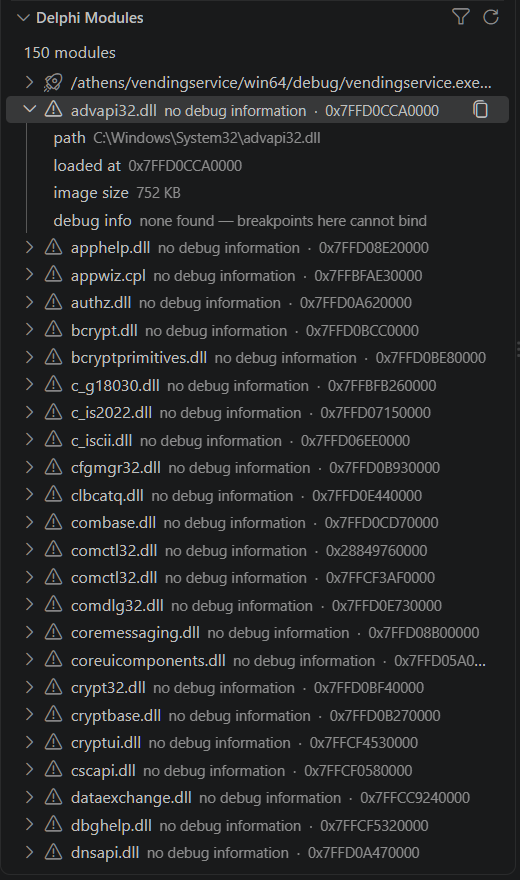
vendingservice.exe here has none open at this scroll
position.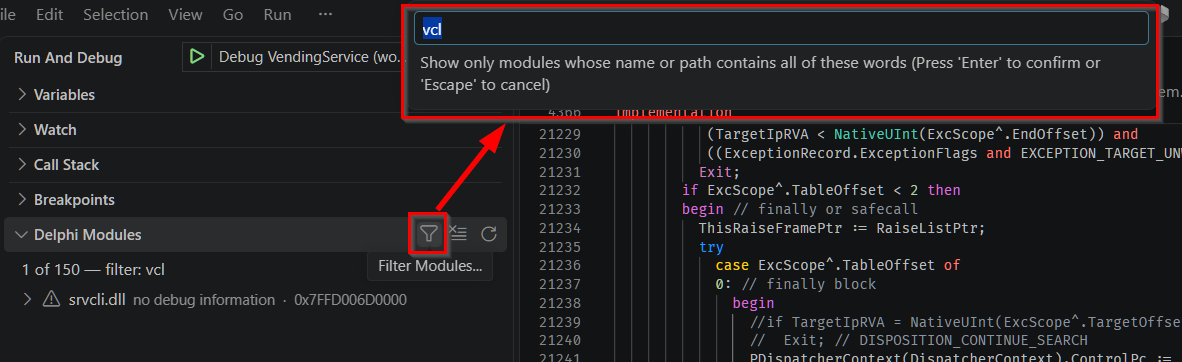
1 of 150 — filter: vcl is the summary line this section describes —
it never lets a filter quietly hide something without saying so.Pointing the debugger at the right debug info
By default the adapter probes for debug-information files beside each module as it loads.
When they live somewhere else, name them explicitly with the modules array,
which works in both launch and attach configurations:
"modules": [
  {
    "name": "InvoiceEngine.bpl",
    "map": "${workspaceFolder}/packages/Win64/Debug/InvoiceEngine.map",
    "dcp": "${workspaceFolder}/packages/Win64/Debug/InvoiceEngine.dcp"
  }
]
name is required; map, rsm and dcp are
each optional. The IDE plugin generates this from the project’s package list, which is
the sane way to get it for a real application.
Finding the sources
The debug information records a source file by name; finding it on disk is a search, and knowing its order is what lets you predict which copy you will get:
- an absolute path, if the debug information carries one and it exists;
sourceRoot, first its top level, then one level down;- the executable’s own directory, then its parent, then its grandparent;
- each
sourceSearchPathsentry, top level first, then two levels down; -
finally, a deep recursive sweep of
sourceRoot— which skips.git,__historyand__recovery, so an old copy in the IDE’s backup folder cannot win.
RTL and VCL units are found automatically through ${env:BDS}/source, without
listing anything. Results are remembered for the session, including the failures — so a
file that was missing when first needed stays missing until you restart, even if you put
it there in the meantime.
Oracle.pas, a frame may open the wrong one at the “same”
line. This is a limitation of the compiler’s debug information, not of the debugger:
TD32’s names table stores only the basename, with no directory. See
Known limitations.
Architecture mismatch
The debugger picks its engine — 64-bit or 32-bit — from the target’s PE header before
the process exists. Once the process is running, its actual architecture is cross-checked
against that decision, and a disagreement produces an explicit [FATAL]
diagnostic rather than a session that misbehaves in confusing ways.
Engine overview explains how the choice is made.